Lecture 13 Introduction to modern Javascript

JS Logo

What is Javascript?

The only client-side programming language that executes in the browser

What can Javascript do?

Famously designed in 10 days by Brendan Eich, a Netscape employee. Originally Mocha, gets renamed to LiveScript 5 months later and JavaScript 3 months after.

Javascript was a language that had…

…the functionality of Scheme
…the object orientation of Self
…and the syntax of Java

Standards

Javascript on the server: Node.js

Javascript on the desktop: Electron

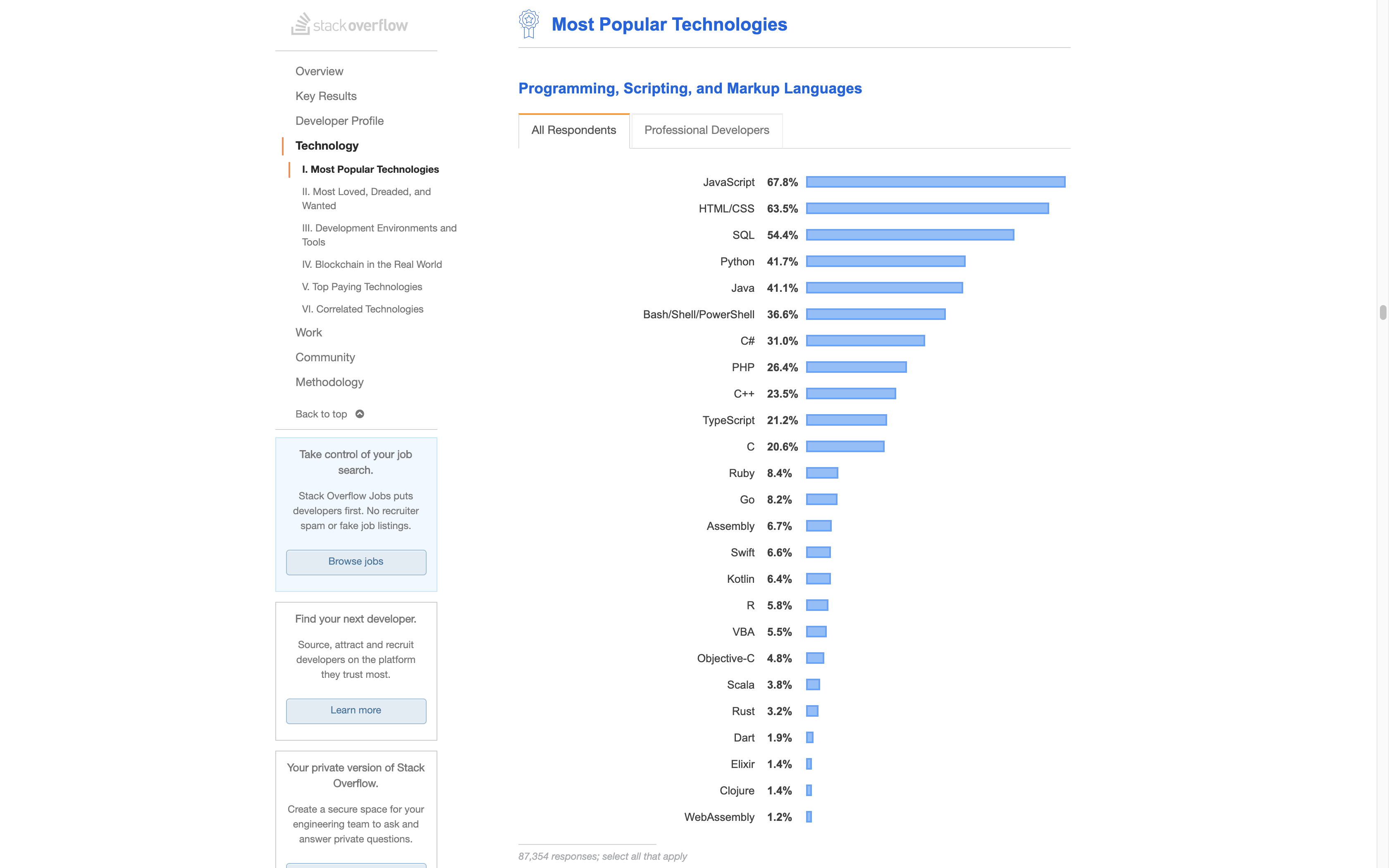
Javascript is the world's most popular programming language

Why is Javascript?

History

You can read about the development of javascript in this article by its creator Brendan Eich.

Netscape's Response

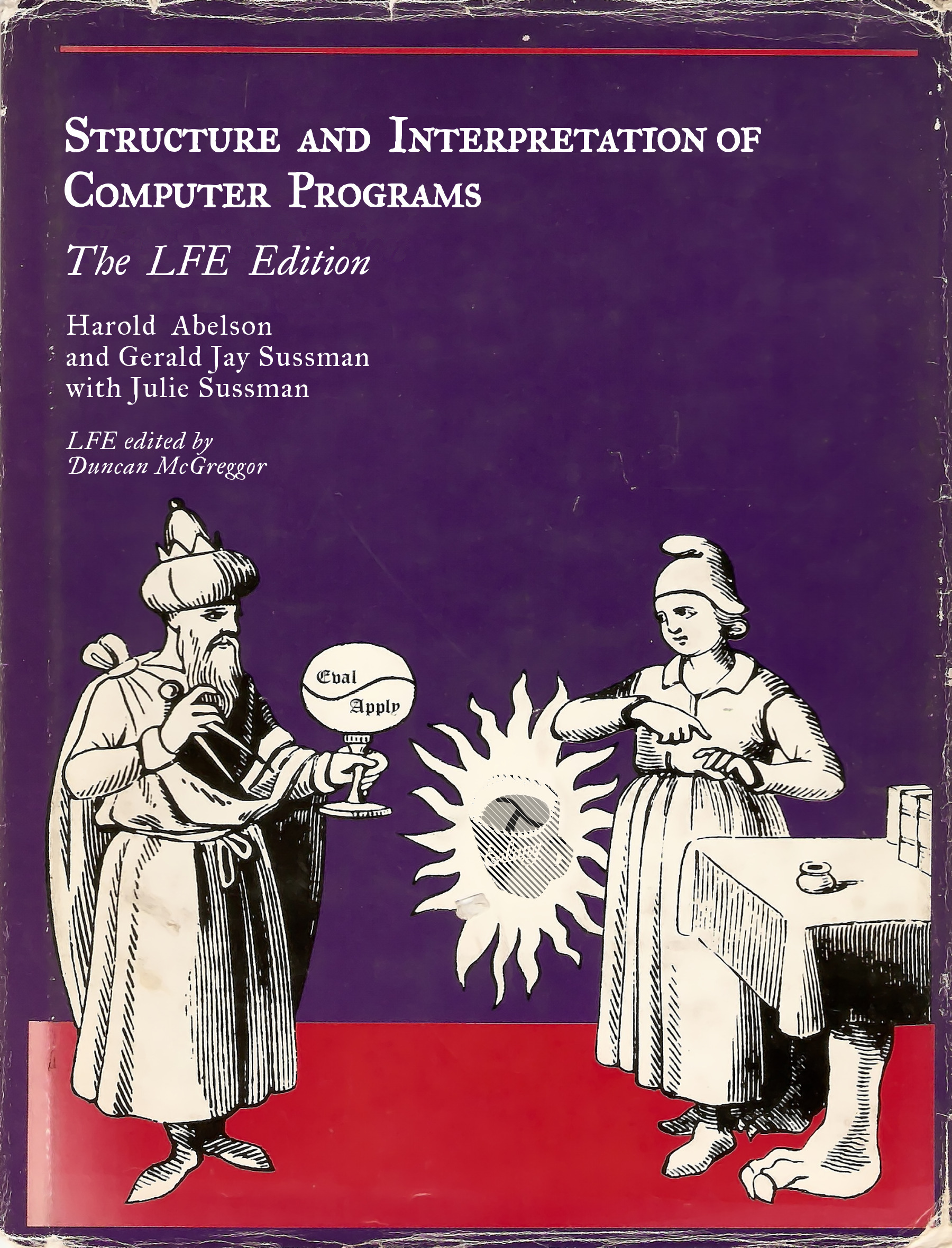
Starting Point: Scheme/LISP

The most elegant programming languge
  • syntactically simple
  • tiny simple interpreter
  • incredibly expressive power
  • developed at MIT
(define (fib n)
	(if (< n 2)
			n
			(+ (fib (- n 1))
				 (fib (- n 2)))))

		

SICP

I was under marketing orders [from Mark Andreessen] to make it look like Java but not make it too big for its britches … [it] needed to be a silly little brother language.

Brendan Eich (source)

The Language

JS Topics

Java: Early syntactic influence


			statement1;
			statement2;
			statement3;
		

			if (condition) {
			statements
			}
		

			for (init; test; step) {
				statements
			}
		

			function name(arg1, arg2) {
				return value;
			}
		
In fact, these particular syntactic aspects are not exclusive to (or even introduced with) Java, but are part of the general C-like syntax of many programming languages - Why not python syntax? Python was barely known in 1995 (first book was in 1996). - Fun fact: Semicolons are actually optional, and may be inserted by the browser if deemed missing (semicolon insertion). This is the cause of many headaches because missing semicolons change the meaning of your code without producing an error. There are linters like [ESLint](https://eslint.org/) to make sure you never forget semicolons.

Script tag

- This is how you run JS in a page. You may find older code without `type="module"` but that has certain quirks and does not allow you to include other scripts.

At first glance, everything seems normal

Braces for blocks, not whitespace

All of the following are functionally equivalent


			if (condition) {
				statement1;
			}
		

			if (condition) {statement1;}
		

		             if (condition)
			statement1;
		

			if (condition) statement1;
		

Braces for blocks, not whitespace

Are the following functionally equivalent?


			if (condition) {
				statement1;
				statement2;
			}
		

			if (condition) {statement1; statement2;}
		

			if (condition)
				statement1;
				statement2;
		

			if (condition) statement1; statement2;
		
It's a good practice to always use braces. Otherwise, it's very easy to get carried away by indentation when we add a second statement and not notice that it's not part of the block. Furthermore, while we could technically do everything on the same line, it's hard to scan, and less convenient for version control.

The Console

The console

Purpose

  • Inspect environment of current window
  • (distinct for each window/tab)
  • And modify it
  • Global variables defined in your code
  • Data logged to console by your code
  • DOM: document structure data
  • Write any JS you like
  • It will execute in current context

Special Variables and Functions

$('#id')
First DOM element matching CSS selector
$$('.class')
Array of all DOM elements matching selector
$0 - $4
Last 5 elements selected in elements panel
$_
Last evaluated expression
Only available in console!

Writing to the console
Very useful for debugging!


			<script type="module">
			console.log("Hello world", 4 * 2 ** 3 + 10)
			console.log({firstName: "David", lastName: "Karger"})
			</script>
		

Let’s unpack this…

>
				4
				*
				2
					** 3
					+ 10
			
< 42

Let’s unpack this…

>
				$$("h1, h2, h3")
			
< [h1,
				h2,
				h3#general-information, ...]

Types and Implicit Coercion)

What if we had typed this instead?

4 * "2" ** 3 + 10
  1. 42
  2. TypeError: "2" is not a number
  3. "3210"
  4. NaN

Implicit Coercion

When an argument has the wrong type, js tries to convert it to the right type, automatically

What if we had typed this instead?

4 * 2 ** 3 + "10"
  1. 42
  2. TypeError: "10" is not a number
  3. "3210"
  4. NaN
Read more about type coercion (very deep and advanced post):

Implicit coercion is a heuristic

Sometimes convenient

slider.step = (slider.max - slider.min)/10

Implicit coercion is a heuristic

Sometimes convenient


			if (new Date() - date < 60000) {
				console.log("Less than a minute ago")
			}
		

Implicit coercion is a heuristic

Often confusing

Code Guess the Result
2 * "5px"
3 == "03"
"" - true
[] + []
Was this fun? A lot more JS curiosities can be found at .

Escaping the heuristic

Code Result
Type conversion
4 * 2 ** 3 + Number("10")
42
Strict equality
3 === "03"
false
Number parsing
2 * parseFloat("5px")
10

Truthy and falsy values

Conditional expressions

JS expression Python expression
a && b a and b
a || b a or b
a ? b : c b if a else c

What is the value of "Hello" && 0?

In JS, like Python, && and || do not always return true/false
Basically conditional operators (if-then-else).

Implicit Coercion useful for Booleans


			if (heading && heading.id) {
				// Heading is non-empty and has an id, linkify
				heading.innerHTML = `<a href="#${heading.id}">
					${heading.textContent}
				</a>`;
			}
		

Usability

What usability considerations might have driven the use of implicit coercion?

Variables and Constants

Variables and constants


			// let declares a variable
			let r = 10;
		

			// const declares a constant
			const π = Math.PI;
		

Again, everything so far seems run-of-the-mill…

In older examples, you will also see var. Don't use it, there are many pitfalls with var that let avoids!

What do you expect to happen?


			let x = "Hello";
			x = 1;
			console.log(x);
		
  1. TypeError: Cannot assign Number to x. x is of type String.
  2. The console logs 1
  3. The console logs "Hello"

JS is dynamically typed: types are associated with values, not with variables

What do you expect to happen?


			let x;
			console.log(x);
		
  1. ReferenceError: x is not defined
  2. The console logs null
  3. The console logs undefined

What is undefined?

What do you expect to happen?


			const π = 3.1415926;
			π = 22 / 7;
			console.log(π);
		
  1. TypeError: Assignment to constant variable
  2. The console logs 3.1415926
  3. The console logs 3.142857143 (22/7)
Why are constants useful?

What do you expect to happen?


			const squares = [1, 4, 9, 16];
			squares[4] = 25;
			console.log(squares);
		
  1. TypeError: Assignment to constant variable
  2. The console logs [1, 4, 9, 16]
  3. The console logs [1, 4, 9, 16, 25]

Constants hold a read-only reference to a value, but that value may be mutable

Why are constants useful? It's an example of letting a programmer articulate an intention that the software can make sure they're following. This is the value of strong typing too. The program can warn you if you use a type you didn't intend to use. Similarly, the program can warn you if you assign to something you didn't plan to change. It indicates you made a mistake, either in the coding a mistake of intention.

Scoping

What do you expect to happen?


			if (true) {
				let x = 1;
			}

			console.log(x);
		
  1. ReferenceError: x is not defined
  2. The console logs 1
  3. The console logs undefined

let (and const) are block-scoped
= only visible within the {...} they’re declared in

What do you expect to happen here?


			if (true) {
				let x = 1;
				log();
			}

			function log() {
				console.log(x);
			}
		
  1. ReferenceError: x is not defined
  2. ReferenceError: log is not defined
  3. The console logs 1
  4. The console logs undefined

JS uses lexical scope
= scope determined by syntax ({...}), not execution

Did you notice anything else?


			if (true) {
				let x = 1;
				log();
			}

			function log() {
				console.log(x);
			}
		
Notice that we were able to call the function before it was used. This is called hoisting and happens with function declarations like this one . There are other ways to declare a function, that do not hoist, which we will learn in the next few lectures.

Declarations are hoisted
= the function is available before it's declared

What do you expect to happen here?


			function f()
				x = 1;
			}

			function log() {
				console.log(x);
			}

			f();
			log();
		
  1. ReferenceError: x is not defined
  2. The console logs 1
  3. The console logs undefined

Assigning to an undeclared variable creates a global variable

this is almost always a mistake

var declarations

Global Scope

Module scope

Objects

Objects


			person = {
				age: 34,
				name: {
				    "1st": "Lea",
				    last: "Verou"
				    },
				height: 170-height(sneaker)
				};
		

JSON

Restricted format used to send and store objects
  • JavaScript Object Notation
  • all properties must be quoted
  • no computed values—only literals
  • valid in code as well

			person = {
				"age": 34,
				"name": {
				    "1st": "Lea",
				    "last": "Verou"
				    }
				"height": 164;
				};
		

Property access

These all result in the same object


			let user = {
				name: "Lea Verou",
				age: 34
			};
		

			let user = {
				name: "Lea Verou"
			};
			user.age = 34;
		

			let user = {};
			user["name"] = "Lea Verou";
			user["age"] = 34;
		

			let user = {
				"name": "Lea Verou",
				"age": 34,
				"hobbies": ["Coding", "cooking"]
			};
			delete user.hobbies;
		

What will happen here?


			let user = {
				name: "Lea Verou",
				age: 34
			};
			console.log(user.hobbies);
		

Any non-existent property, on any object, can be read and just returns undefined

What will be logged here?


			let user = {
				name: "Lea Verou",
				age: 34
			};
			user.age = undefined;
			console.log(user);
		

undefined can also be a legit property value. Setting a property to undefined does not delete it.

null vs. undefined

What will be logged here?


			let hobbies = ["Coding", "Cooking"];
			hobbies.user = "Lea Verou";
			console.log(hobbies.length, hobbies.user);
		

Arrays are just special objects. Any object can have properties added to it at any point.

What will be logged here?


			let hobbies = ["Coding", "Cooking"];
			hobbies["1"] = "Dining";
			console.log(hobbies[1], hobbies["1"]);
		

Array indices are merely numerical properties (including strings that evaluate to numbers)

Functions can be object properties


			let greet = function() {
				console.log(`Hi, I’m ${this.name}`);
			};
			let instructors = [
				{name: "Lea", greet: greet},
				{name: "David", greet: greet}
			];

			for (let instructor of instructors) {
				instructor.greet();
			}
		
- When functions are properties of objects they are called *methods* - There is nothing special about these properties, they can be overwritten, reassigned, added to objects we don’t own etc. - When a function is called as a method, its special `this` parameter points to the object itself. This is called the *function context* and we will explore it in more detail soon. - Note that `console.log()` is a method of the `console` object.

Methods = Functions + Object properties

" Hello!   ".trim() // "Hello!"
- A heuristic worth remembering about whether we need a method: if we don't actually need access to an object, then there's no point making the function a method.

Window Object and Global scope

Programming Language Usability

The Document Object Model (DOM)

Peeling back the Vuejs cover

DOM


			<!DOCTYPE html>
			<html>
			<head><title>Hello world</title></head>
			<body><p>Hello <em>world</em> 👋</p></body>
			</html>
		

Our DOM Tree

Document node Element nodes Text nodes
  • The browser’s internal model of our HTML is called the DOM Tree
  • It’s a hierarchy of objects of different types, such as:
    • Document: This is the root node, and does not correspond to any HTML element.
    • HTMLElement: Every HTML element, such as html, body, or em is of this type. Usually, they merely inherit from HTMLElement, and are an instance of a more specific type such as HTMLHtmlElement, HTMLBodyElement and so on.
    • Text: Text nodes, such as "Hello ", "world", and "!" in our example. These never contain any other element, they are always leaves.
    • Comment: HTML comments (<!-- like this -->) are represented by objects of this type.
  • This hierarchy of objects is crucial for CSS styling, as we will see in a couple lectures.
  • We can interact with, and manipulate the DOM tree via JavaScript!

Let’s unpack this…

>
				$$("h1, h2, h3")
			
< [h1,
				h2,
				h3#general-information, ...]

The DOM Environment and Global Variables/Objects


				window: {
				  innerHeight: /* height of window in pixels */,
				  close: function () {
				    /* closes window if invoked */ },
				  …
				  document: { /* object representing document */
				    title: /* title of document */
				    location: /* url of document */
				    head:  /* HTMLElement representing head*/,
				    body: /* HTMLElement representing body*/
				    …
				  }
				}
		

DOM Traversal

Nodes element.parentNode element.childNodes element.firstChild element.lastChild element.nextSibling element.previousSibling
Elements element.parentElement element.children element.firstElementChild element.lastElementChild element.nextElementSibling element.previousElementSibling

Elements vs. Nodes

DOM Manipulation
Insert and remove nodes

Remove nodes element.remove()
Insert nodes element.append(newElement) element.before(newElement) element.after(newElement) element.replaceWith(newElement) el.insertAdjacentElement("beforebegin", newEl)

DOM Manipulation
Attributes

DOM Manipulation
String-based

With text (no HTML allowed) element.textContent = "Hi"
With HTML element.innerHTML = "<em>Hi</em>" element.outerHTML = "<em>Hi</em>" element.insertAdjacentHTML("afterend", "<em>Hi</em>")
These methods are very useful for writing lots of HTML in one fell swoop, and every fast. However, be careful: they create new elements, and throw your existing elements into DOM hyperspace, ready to be garbage collected (unless there are references to them). This means that any existing references to these elements will now point at different, dangling elements!

The DOM is Reactive

IDs create global variables


				<button id="submit">Submit</button>
			

				console.log(submit, window['submit']);
			
This is very useful for rapid iteration, testcases etc. Note that this is why you should avoid using untrusted (e.g. user-generated) content as ids (and if you have to, make sure the id has a fixed prefix). This particular security vulnerability is called [DOM clobbering](https://portswigger.net/web-security/dom-based/dom-clobbering).

DOM querying


				let selector = "h1, h2, h3, h4, h5, h6";

				// Get all headings in the current document
				let headings = document.querySelectorAll(selector)
			

				// Get the first heading in the current document
				let firstHeading = document.querySelector(selector)
			
- “DOM querying” is the process of obtaining references to one or more DOM elements that you want to do stuff with. - In older code you may find other DOM querying methods, such as `document.getElementById()`, `document.getElementsByTagName()`, `document.getElementsByClassName()`, `document.getElementsByName()`. These preceded the ability to be able to query by CSS selector, and are now rarely used.

A "Vuecation"

What if we wanted to change the titles of all Monday lectures?

3 ways to iterate

Classic C-style for

Low level, trades readability for power

						for (let i=0; i<mondayLectures.length; i++) {
							const lecture = mondayLectures[i];
							lecture.textContent = "I hate Mondays 😫";
						}
					

for...in

Iterate over object properties

						for (const i in mondayLectures) {
							const lecture = mondayLectures[i];
							lecture.textContent = "I hate Mondays 😫";
						}
					

for...of

Iterate over iterable objects like arrays

						for (const lecture of mondayLectures) {
							lecture.textContent = "I hate Mondays 😫";
						}
					

Activity: Remove all CSS from a page

Hint: element.remove() removes an element from the DOM

We’ve removed external stylesheets and style elements. What remains?

			element.remove();
		
parentElement.textContent = "";
parentElement.innerHTML = "";

Where do removed DOM elements go?

🦅 Garbage Collection

We can convert our CSS removal code to a bookmarklet!

Paste code in the box and drag this bookmarklet link to your bookmarks bar.

Usability